UAESY
How it works

Set it up once, then just answer the reminders

UAESY is built around the way a UAE tenancy actually runs: a unit, a contract, a fan of post-dated cheques and a stream of costs going the other way. Below is the whole path, from the first building you add to the month closing itself.

Free right now — no credit card

What to have on hand

Nothing here blocks you from starting — every field can be filled in later — but with these three things ready the first property takes minutes rather than an evening.

  • The unit details

    Building name, unit number and size. The title deed, DEWA premise number and purchase price if you have them: they turn the profit figures from rough into exact.

  • The tenancy papers

    The signed contract, the Ejari certificate and the tenant's Emirates ID or passport. Attach them once and they stay with the contract for its whole life.

  • The cheques

    Cheque numbers, the issuing bank, amounts and dates. Post-dated cheques are the normal case here, and the payment schedule is built around them.

The four steps, in full

Each one is a single form. Everything you enter is reused by the next step, so the work gets lighter as you go.

  1. About a minute per unit

    Add the building, then its units

    A tower is one record with its flats underneath, a villa is a record of its own. You type the address once; every unit inherits it.

    • Purchase price and annual service charge go in once and feed every profit figure afterwards.
    • Title deed, DEWA premise number and photos live on the unit instead of in a folder on your desktop.
    • A unit with no contract yet still counts — it shows as vacant in the occupancy figure.
  2. About two minutes per contract

    Draft the tenancy and its cheque schedule

    Tenant, dates and annual rent go into one form, and the schedule of payments is generated from them before you leave the page.

    • One, two, four or twelve cheques — or an irregular split you set by hand when the tenant negotiated one.
    • The security deposit is tracked separately from rent, so it never inflates your income.
    • Ejari and the signed PDF attach to the contract and follow it into the renewal.
  3. A few seconds per cheque

    Bank the cheques as they fall due

    The schedule tells you which cheque is ready this week. Each move you make to it updates the linked payment in the same breath.

    • Mark it deposited the day it goes to the bank, cleared when the funds land.
    • A bounce keeps the record and opens a replacement, so the history survives the conversation that follows.
    • A UAE cheque is good for six months from its date — UAESY counts those days for you.
  4. A minute in the morning

    Read the result and act on what is flagged

    After the first month there is no data entry left to do — only the handful of things the dashboard has pulled to the top.

    • Income, expenses and net profit for one property or across everything you own.
    • Cash or accrual: money that has actually landed, or money that was earned in the period.
    • Tenancies ending inside ninety days sit beside the expenses nobody has paid yet.
Income

Every cheque carries its own history

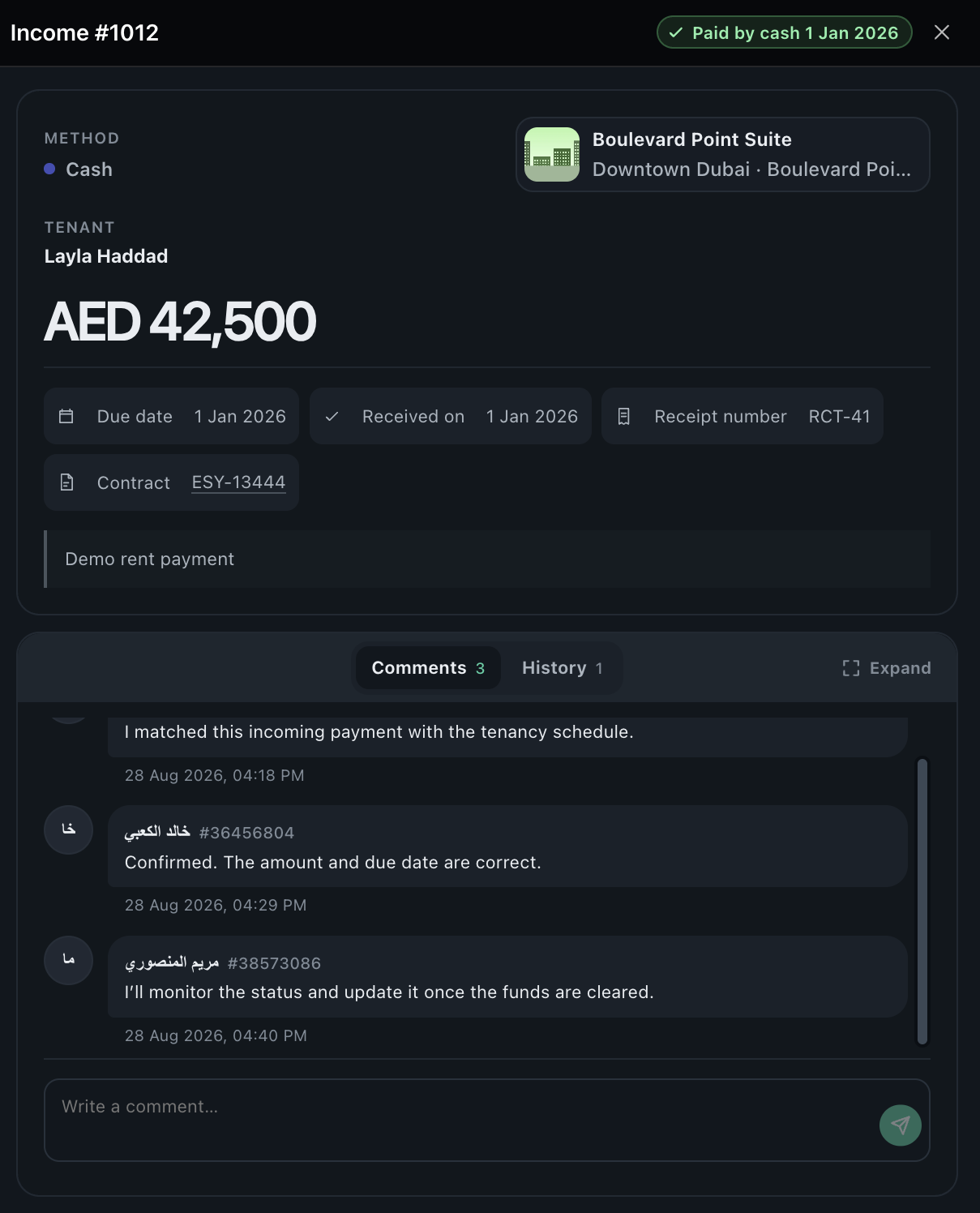
Open a payment and you see the cheque behind it: number, bank, the date it was written, the day it was banked and what happened next. Bounced cheques keep their reason and point at the cheque that replaced them, so a year later the trail still reads cleanly — for you, for your accountant, and for any conversation with the tenant.

The incoming payments list with cheque statuses
The result

The month closes itself

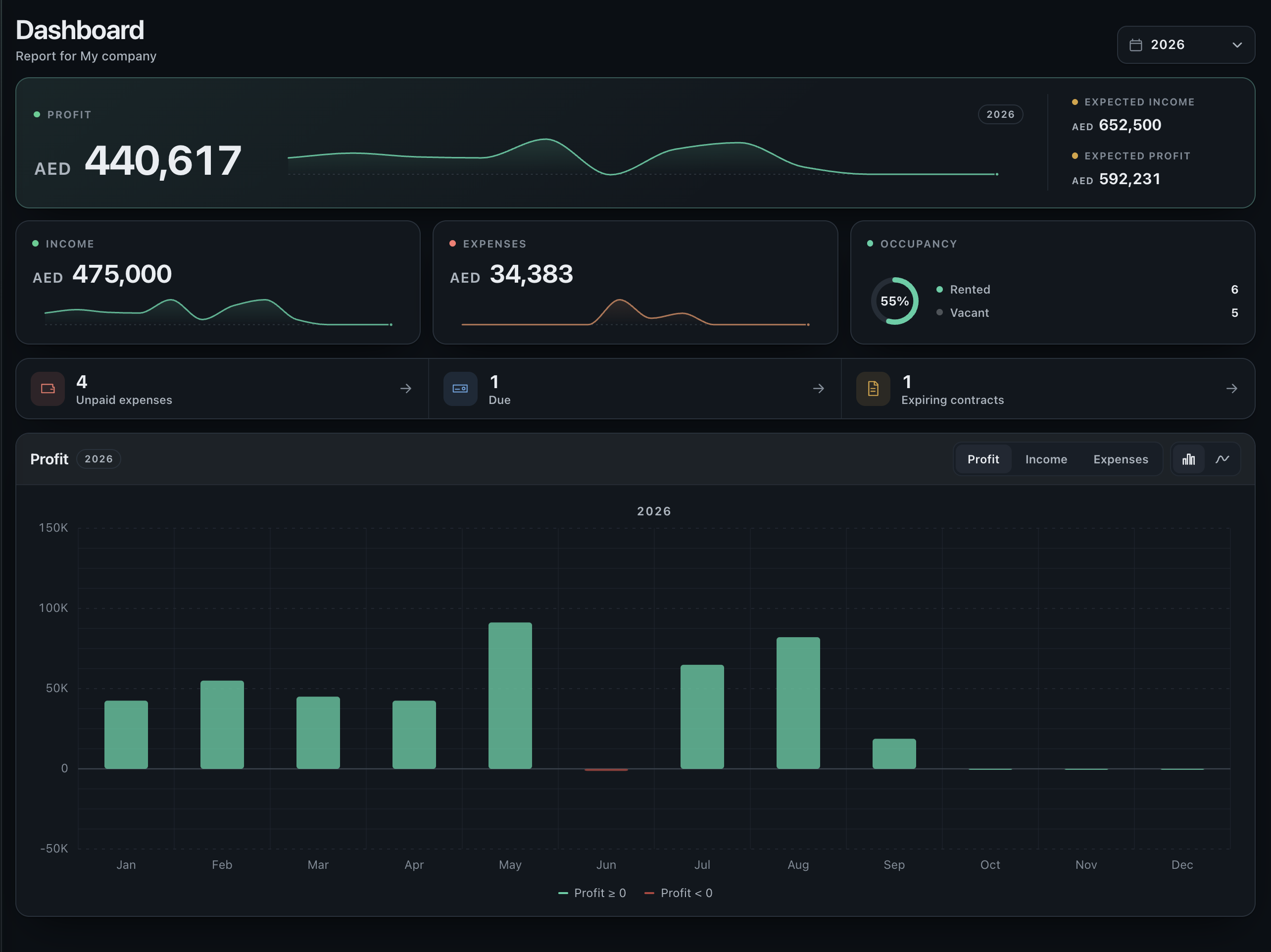
Because every cheque and every expense is already attached to a unit, there is no month-end assembly. Profit by property, occupancy across the portfolio and the list of what needs attention are simply there — the same picture in the browser and in the iOS app, in English or Arabic.

The dashboard with income, expenses and occupancy

The life of one cheque

Five states, and the linked payment moves with every one of them. Nothing is ever counted twice, and nothing is quietly deleted.

  1. Pending

    Written, dated, in your drawer. It appears on the schedule from the moment the contract is saved.

  2. Deposited

    Handed to the bank. The payment moves to in-progress, so it is neither outstanding nor yet income.

  3. Cleared

    The funds landed. On a cash basis the income falls in the month it cleared, not the month it was written.

  4. Bounced

    Returned unpaid. The reason is kept, the payment reverts to outstanding and the contract is flagged.

  5. Replaced

    A new cheque takes its place, linked to the old one so neither disappears from the record.

A cheque can also be cancelled — by agreement, or when a tenancy ends early. The payment goes back to unpaid and the reason stays on the record.

What happens while you are not looking

The four things landlords most often find out about too late are the four things UAESY watches on its own.

  • Presentment windows

    Six months from the date on the cheque. You hear about it before the window closes, not after the bank has refused it.

  • Contracts running out

    Ninety days ahead, a tenancy that is ending appears on the dashboard — enough time to renew, raise or re-let.

  • Recurring costs

    Service charge, DEWA, chiller, maintenance contracts: set the cadence once and each instalment appears on its own date.

  • Anything overdue

    Unpaid expenses and cheques past their date are pulled to the top of the dashboard and kept there until they are settled.

Questions people ask before they start

Do I have to enter the whole portfolio first?

No. One property with one contract is already useful, and nothing depends on the rest being there. Most people add the second and third unit over the following week.

What if a tenant pays by bank transfer?

Payments do not have to be cheques. Record a transfer or cash against the same schedule and it behaves exactly the same way — the cheque fields simply stay empty.

Can my manager or accountant work in it too?

Yes. Invite them to the workspace and they see the same records you do, so nobody is emailing spreadsheets back and forth.

What happens when a contract renews?

Draft the new tenancy from the old one: tenant, unit and terms carry over, you change the rent and the dates, and the previous contract stays in the unit's history.

Does it really work in Arabic?

The whole interface is English and Arabic, right-to-left where it belongs — on the web and in the iOS app. You can switch language at any time without losing your place.

What does it cost to try?

Nothing, and no card is asked for. There is also a demo workspace with properties, contracts and cheques already in it if you would rather look before typing.

Five minutes now, and the rest of the year is reminders

Start with one unit and one contract. If it does not save you the evening you usually spend on this, you have lost five minutes.